
Skip to content
eSolverBooks

Import operations

Import & LC Management

Connect letters of credit, shipments, bank activity, customs costs, supplier payments, and landed inventory value in one complete import record.

eSolverBooks  /  Import & LC  /  Import & LC dashboard

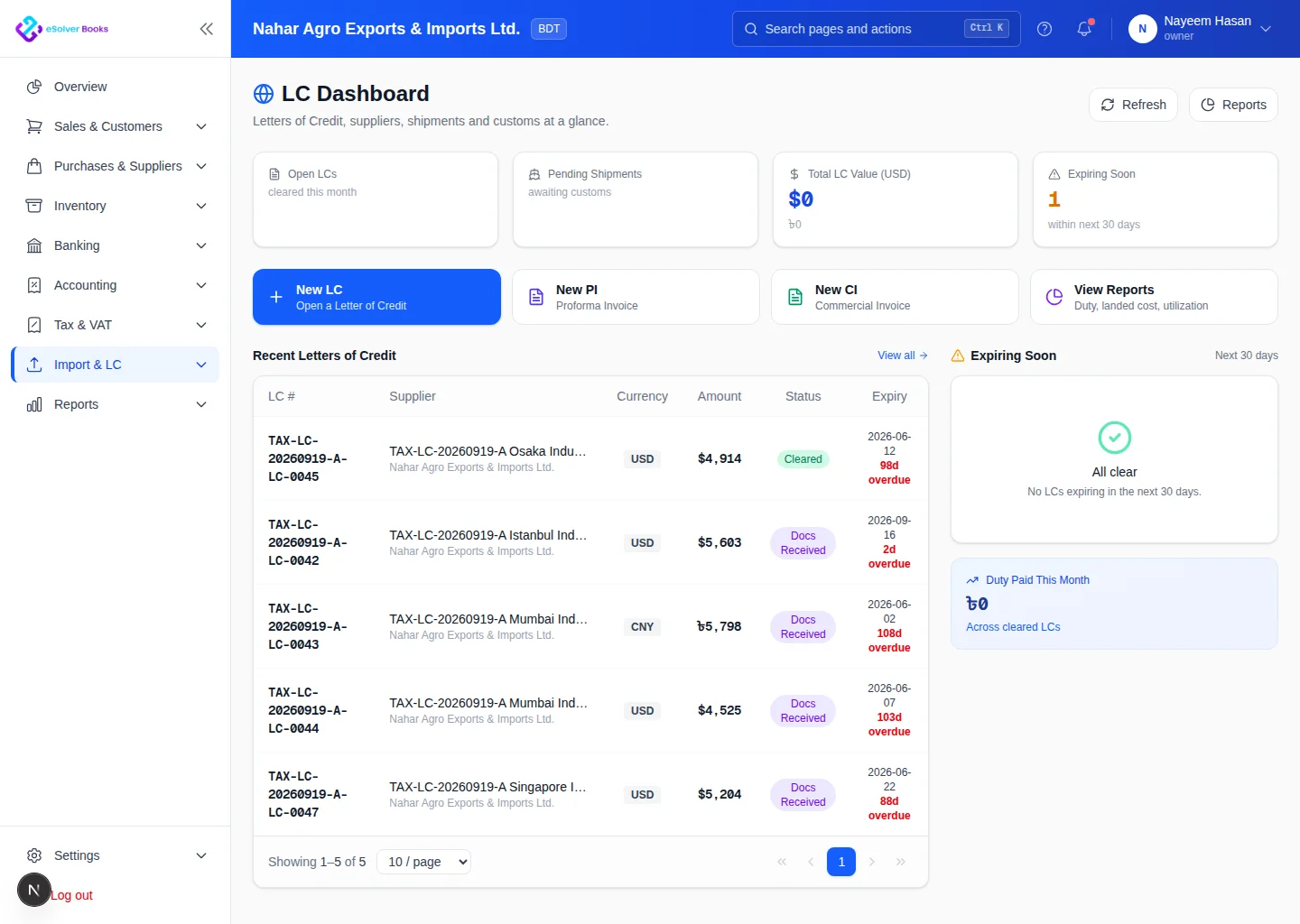
Import and letter of credit dashboard showing multi-currency LC balances and shipment status
Multi-currency LCs, shipments, customs and expiry risk.

One connected workflow

See the complete operational and financial picture

Imported goods pass through commercial, banking, shipping, customs, inventory, and accounting stages. eSolverBooks keeps those records connected so every cost and milestone remains visible from the proforma invoice through warehouse receipt.

The everyday problem

Where businesses like yours lose time and money

Costs arrive in pieces

Freight, insurance, port charges, customs duty, clearing agent bills and bank charges come from different people on different days. Unless someone collects them, the item is stocked at invoice value and the margin looks better than it is.

Exchange rates move between the LC and the payment

A shipment opened at one rate and settled at another leaves a difference that has to land somewhere in the books. Spreadsheets rarely track it.

Bank and shipment status sit in different places

The bank has the LC, the clearing agent has the shipment and the accountant has neither. The owner asks where a consignment stands and the answer is a round of phone calls.

Supplier advances and balances drift

Advance payments and partial settlements to foreign suppliers are easy to lose track of over months.

Core capabilities

Everything the workflow needs to stay connected

LC and bank tracking

Record facilities, margin, amendments, charges, settlements, and the bank activity associated with each letter of credit.

Shipment milestones

Follow supplier documents, shipping references, arrival dates, customs activity, and goods receipt from one import file.

Landed cost allocation

Collect freight, duty, insurance, port, clearing, and related charges before allocating the true cost to inventory.

Document control

Keep commercial invoices, packing lists, shipping documents, and supporting records connected to the transaction.

Supplier obligations

Track foreign supplier balances, advances, settlements, exchange effects, and associated payment history.

Import profitability

Compare complete acquisition cost with inventory value and subsequent sales information.

How it works

A clear path from setup to reporting

01

Open the import file

Capture the supplier, proforma invoice, currency, item, quantity, bank, and LC terms.

02

Track movement and cost

Update shipment progress and add every banking, freight, customs, and clearing expense.

03

Receive and finalize

Receive goods, allocate landed costs, update inventory, and close the financial position.

Business outcomes

Turn connected records into practical control

A complete cost history for each shipment

Fewer disconnected import spreadsheets

More accurate imported inventory value

Clearer supplier and bank balances

Compliance

Imports and the accounts that follow them

Import transactions touch customs, banks and VAT. eSolverBooks does not replace customs or bank systems; it keeps your own records of each shipment organised and traceable.

  • Customs and duty calculation, HS codes and duty drawback claims are available on the Enterprise plan for importers who need them.
  • VAT on imported purchases is kept with the purchase record, so it is traceable when the monthly Mushak-9.1 return is prepared.
  • Treasury challan records sit alongside other tax deposits, so payments to the government are not scattered across files.
  • Rates, duties and thresholds change; configure them with your own customs and tax advisers and keep the source documents attached.

Day one

What you can do on your first day

  1. 1Add your overseas suppliers with their currency and payment terms.
  2. 2Add the banks that issue your letters of credit as bank accounts.
  3. 3Open an import file for your next or current shipment with the proforma invoice details.
  4. 4List the cost heads you pay on each import: freight, insurance, port, clearing, bank charges.
  5. 5Record the charges against the shipment as they arrive.
  6. 6Receive the goods and allocate landed cost to stock.
  7. 7Check the item's landed unit cost against your selling price.

Questions

Common questions about Import & LC Management

What is landed cost and why does it matter?

Landed cost is the full price of getting goods into your warehouse: the invoice value plus freight, insurance, duty, port and clearing charges and related bank costs. Stock valued at invoice alone overstates margin. eSolverBooks lets you allocate these charges to the received items.

Which plan includes Import and LC?

Import and LC, with LC tracking, proforma and commercial invoices, landed cost analysis, customs and duty calculation and duty drawback claims, is part of the Enterprise plan.

Can I handle foreign currency suppliers?

Yes. The Enterprise plan includes multi-currency invoicing and forex management, so overseas suppliers and exchange differences are part of the books.

Does it submit anything to the bank or customs?

No. eSolverBooks keeps your own records and calculations; it does not file customs declarations or send instructions to banks. You continue to use your bank and clearing agent for that.

Can I track cheques and bank loans linked to imports?

The Enterprise plan includes cheque and PDC management and loan and EMI tracking, which importers often use alongside LC facilities.

Get started

Build this workflow around your business

Discuss your current process, data, team, and reporting requirements with eSolverBooks.