
Lot-level cost
Each batch records its own cost price, so profit on a sale reflects the lot actually sold.
Included in the Enterprise plan
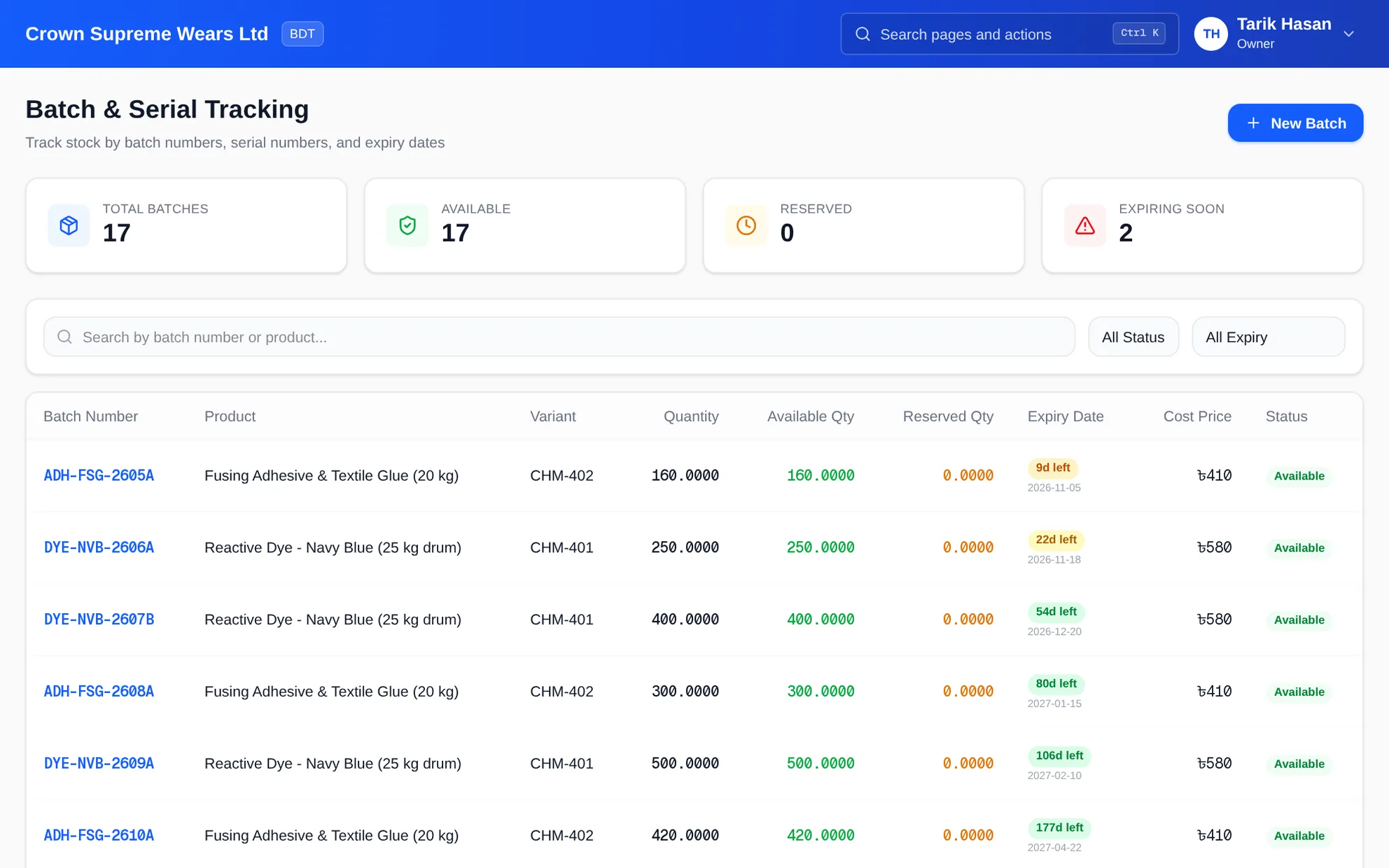
Food, pharmaceutical, chemical and trims businesses need to trace goods by lot, not just by product. Capture a batch number, quantity, cost and expiry date at receipt, then let sales draw the earliest expiry first and keep expired lots from being sold.
eSolverBooks / Inventory / Batch & expiry
How it works
A practical workflow your team can follow without adding disconnected spreadsheets or repeated data entry.
Enter the batch or lot number, quantity, cost price and expiry date when goods are received.
Filter batches expiring in 30, 60 or 90 days and act on slow movers before they expire.
Sales draw from the earliest-expiring lot, and expired lots are not sold.
Recall a batch to zero its available quantity and block further allocation.
What you get
Less write-off from expired stock, traceability when a lot has a problem, and cost that follows the lot instead of an average.
Each batch records its own cost price, so profit on a sale reflects the lot actually sold.
On the Enterprise plan, sales take the earliest expiry first, and expired lots are never sold.
Batches are Available, Reserved, Expired or Recalled, with available and reserved quantity shown separately.
See what expires in the next 30, 60 or 90 days, and an expiry report ranked by days remaining.
Recalling a batch creates a stock adjustment, blocks further allocation and can reverse movements after a chosen date.
Even where there is no expiry, lot numbers such as KRT-LOT-2610A let you trace production and purchase lots.
Feature details
Understand the main workflow, what belongs inside it and how each capability supports accurate daily work.
Main feature item
Identify stock from day one.
What it includes
4 connected capabilities designed to keep this part of batch & expiry tracking organized.
Included sub-items
Assign the supplier's or your own lot number to each receipt, linked to the product and variant.
Record how many arrived and what each unit cost, so valuation follows the lot.
Add an expiry date where it matters, or leave it open for non-perishable lots.
Link each batch to the product and variant it belongs to, such as a specific size or fabric.
Main feature item
Act before stock turns into loss.
What it includes
4 connected capabilities designed to keep this part of batch & expiry tracking organized.
Included sub-items
Show batches expiring within 30, 60 or 90 days.
List batches approaching expiry with days remaining and available quantity.
Filter by Available, Reserved, Expired or Recalled to see exactly what can be sold.
Quantity reserved for confirmed orders is separated from what is free to sell.
Main feature item
Let the system pick the lot.
What it includes
4 connected capabilities designed to keep this part of batch & expiry tracking organized.
Included sub-items
Sales and issues take the earliest-expiring available lot automatically.
Expired lots are excluded from selling, which protects customers and your licence.
Returned goods go back to the store and bin they were sold from.
Stock reserved for confirmed orders is shown separately from available quantity.
Main feature item
Respond quickly when a lot has a problem.
What it includes
4 connected capabilities designed to keep this part of batch & expiry tracking organized.
Included sub-items
Open a batch to see every movement in and out of it.
Zero the available quantity and block further allocation in one step.
Optionally reverse movements after a chosen date to unwind recent issues.
Recalls and adjustments record who acted and when.
Accounting reference
This feature explanation is informed by recognized accounting and control guidance. Your configuration and filing obligations should still be reviewed for your organization and jurisdiction.
Keep exploring
Create a clearer workflow and give your team information they can understand and trust.