
Monthly granularity
Enter twelve monthly amounts instead of one yearly number, so seasonal businesses are budgeted realistically.
A budget is only useful if you compare it with reality. Plan monthly revenue and expenses by account and cost centre for the fiscal year, then see budget, actual and variance side by side from the same ledger that records your transactions.
eSolverBooks / Accounting / Budget vs actual
How it works
A practical workflow your team can follow without adding disconnected spreadsheets or repeated data entry.
Select the year by its starting year, in line with your July-June financial year.
Pick a revenue or expense account and optionally a cost centre, then enter the monthly amounts. The annual total adds up for you.
Invoices, bills, expenses and journals post to the ledger as usual. Nothing is re-entered for the comparison.
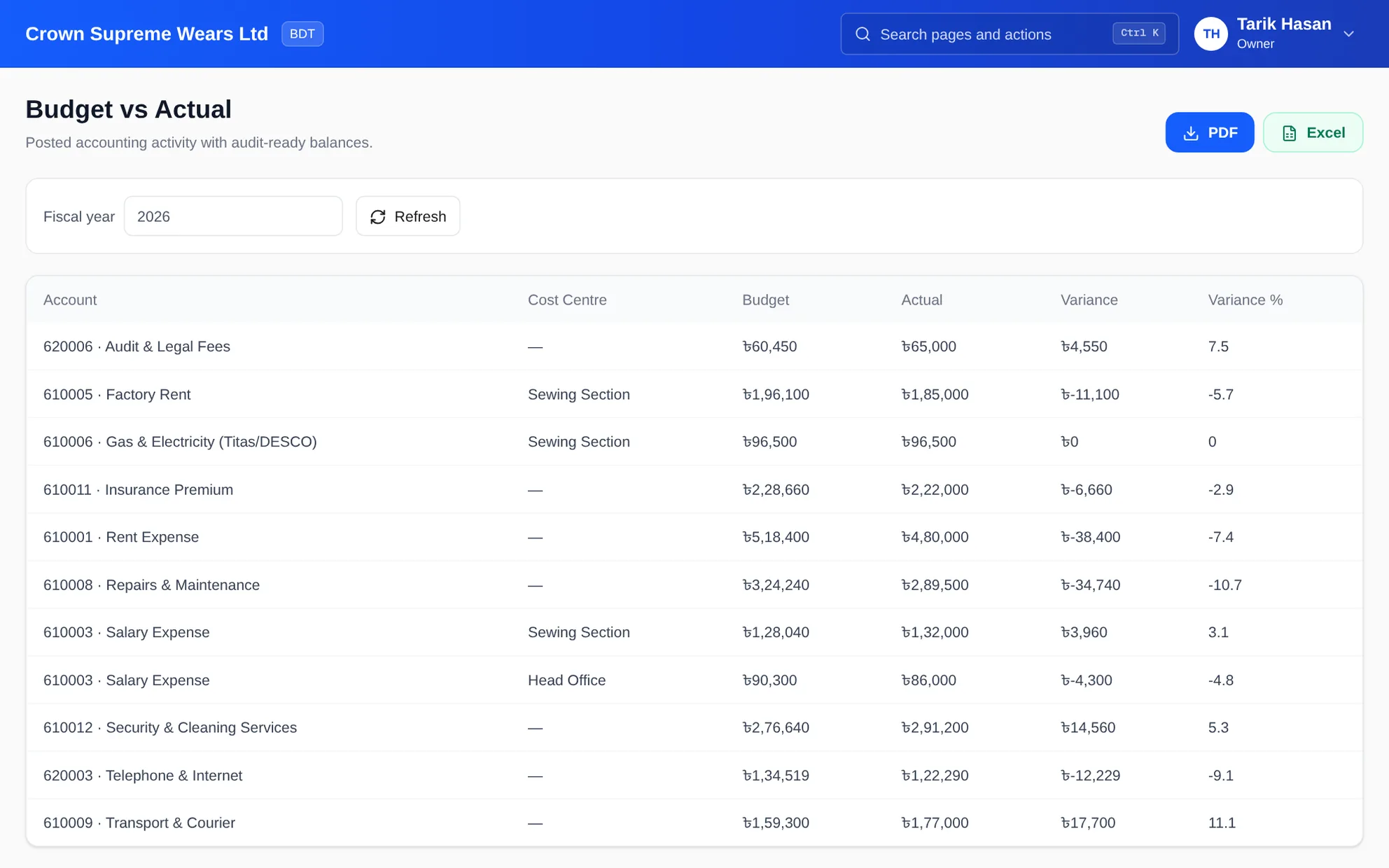
Open Budget vs Actual to see budget, actual, variance and variance percentage, and export to PDF or Excel.
What you get
Owners spot overspending while there is still time to act, and branch or department heads are held to numbers they helped set.
Enter twelve monthly amounts instead of one yearly number, so seasonal businesses are budgeted realistically.
Budget the same account separately for the sewing section, the showroom and head office, then compare each.
The actual column is posted accounting activity, not a second set of numbers someone has to maintain.
See how far each line is from plan in both BDT and percentage terms.
Hand the budget review to the board, a lender or a branch manager in the format they prefer.
Cost centres and budgets are on the Professional and Enterprise plans.
Feature details
Understand the main workflow, what belongs inside it and how each capability supports accurate daily work.
Main feature item
Enter the plan once, by month.
What it includes
4 connected capabilities designed to keep this part of budgets & budget vs actual organized.
Included sub-items
Choose any revenue or expense account, and optionally tie the budget to a cost centre.
Enter each month separately, with a running annual total and an optional planning note.
Keep separate budgets per fiscal year and look back at earlier years.
Revise a budget as the year changes, or delete a line that is no longer needed.
Main feature item
One report, one source of truth.
What it includes
4 connected capabilities designed to keep this part of budgets & budget vs actual organized.
Included sub-items
Every line shows the budgeted amount, the posted actual, the variance and the variance percentage.
See which section, branch or department a line belongs to, so accountability is clear.
Choose the year and refresh to see the latest posted activity.
The report reads posted accounting activity, so figures reconcile to the general ledger.
Main feature item
Turn variance into decisions.
What it includes
4 connected capabilities designed to keep this part of budgets & budget vs actual organized.
Included sub-items
Lines that run far past plan are visible immediately in the variance column.
Large unspent budgets show planned work that has not started, or revenue that has not arrived.
Use the general ledger and cost centre performance reports to look into a variance.
Export PDF or Excel for review meetings, rather than rebuilding numbers in a spreadsheet.
Main feature item
Designed around local practice.
What it includes
4 connected capabilities designed to keep this part of budgets & budget vs actual organized.
Included sub-items
Budgets follow the fiscal year most Bangladeshi companies use.
Budget rent, gas and electricity, salaries, transport and marketing by section, as manufacturers and retailers do.
Amounts are shown in BDT with the lakh and crore grouping your team reads daily.
Pair budgets with unit-level profit and loss to judge each branch fairly.
Accounting reference
This feature explanation is informed by recognized accounting and control guidance. Your configuration and filing obligations should still be reviewed for your organization and jurisdiction.
Keep exploring
Create a clearer workflow and give your team information they can understand and trust.