
Reverses the whole entry
A credit note puts back the revenue, VAT and supplementary duty it reverses, so the return report and the ledger agree.
Goods come back, a price is revised, a charge was missed. Instead of deleting or editing an issued invoice, issue a credit note to reduce what the customer owes, or a debit note to bill an additional charge. Each one is numbered, reasoned and traceable.
eSolverBooks / Sales / Credit notes
How it works
A practical workflow your team can follow without adding disconnected spreadsheets or repeated data entry.
Start a credit note for a customer and, if you wish, choose the invoice being credited from that customer's issued invoices.
Every credit note needs a reason, such as returned goods or a price correction, so the record explains itself.
Revenue, VAT and supplementary duty are reversed, and the invoices it settled reopen. Returned goods go back to the store and bin they were sold from.
Download the credit note as Mushak-6.7 for the customer.
What you get
Returns and corrections reverse revenue, VAT and stock in one action, and your records stay clean enough to show an NBR officer or an auditor.
A credit note puts back the revenue, VAT and supplementary duty it reverses, so the return report and the ledger agree.
Returned goods re-enter the store and bin they were sold from, keeping stock by location accurate.
Download the credit note in the NBR format straight from the document instead of drafting it separately.
Bill a late-payment service charge, a rush-order surcharge or a re-delivery charge without re-issuing the invoice.
If a note was raised in error, void it: ledger entries are reversed and the number stays on record for audit.
Credit and debit notes are available on Starter, Professional and Enterprise.
Feature details
Understand the main workflow, what belongs inside it and how each capability supports accurate daily work.
Main feature item
Reduce what the customer owes.
What it includes
4 connected capabilities designed to keep this part of credit & debit notes organized.
Included sub-items
Credit a specific invoice, or raise a credit note against the customer alone for goodwill and adjustments.
Add the lines being credited, with VAT and supplementary duty reversed to match.
A reason is required, which stops unexplained credits from appearing in the ledger.
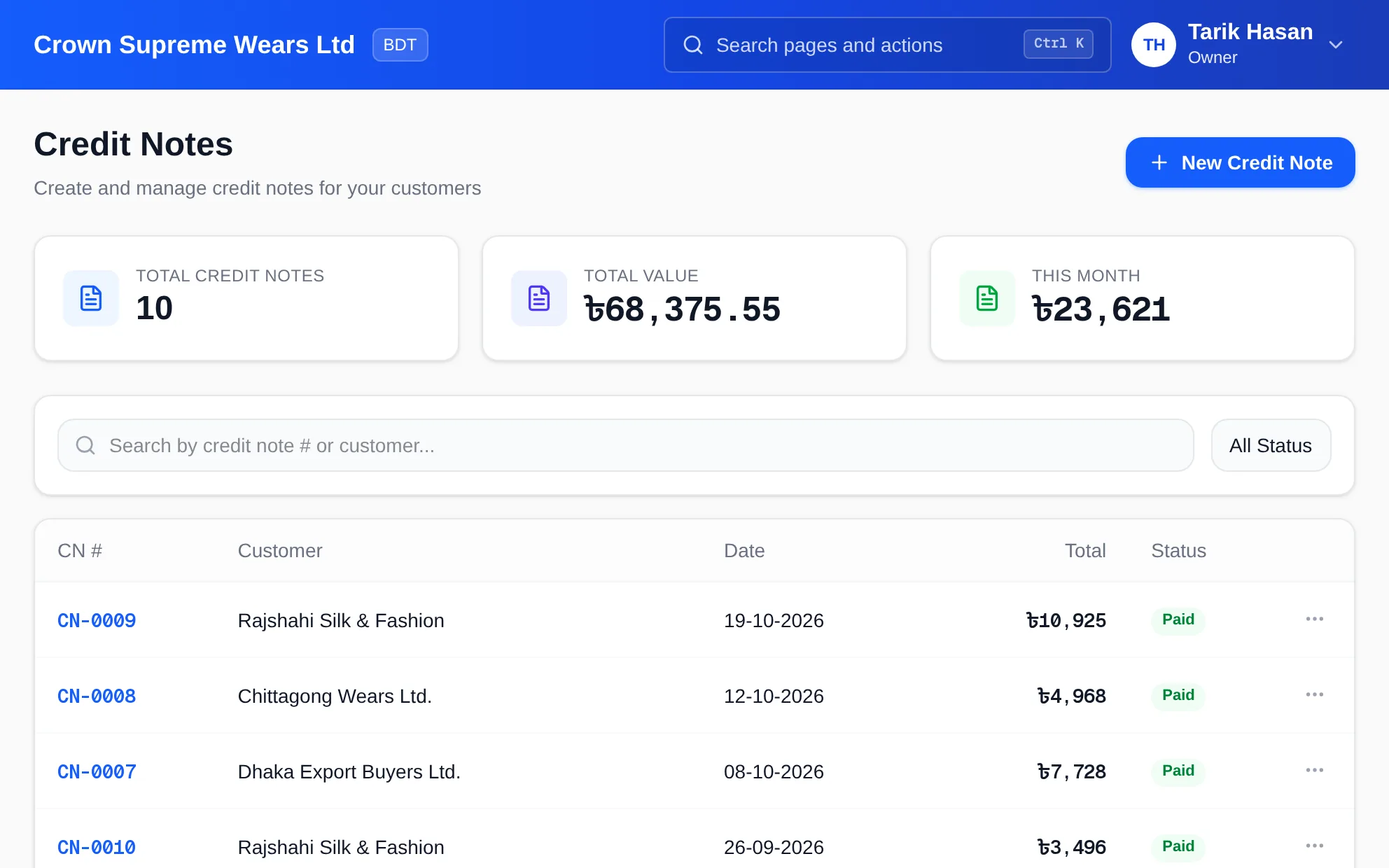
See every credit note with its number, customer, date, total and status, plus the value credited this month.
Main feature item
Increase what the customer owes.
What it includes
4 connected capabilities designed to keep this part of credit & debit notes organized.
Included sub-items
Late payment service charge, rush order surcharge, additional packaging, transport charge not billed, or a price difference.
A debit note raises a receivable on the customer account, so it follows normal collection and aging.
Debit notes carry their own sequence, separate from invoices and credit notes.
The reason is shown with the note so the customer understands the charge.
Main feature item
Keep VAT truthful after a return.
What it includes
4 connected capabilities designed to keep this part of credit & debit notes organized.
Included sub-items
Output VAT is reduced by the credit, so your Mushak-9.1 return reflects the correction in the right period.
Credit notes can be downloaded as Mushak-6.7. Always confirm current NBR requirements for your own filing.
Notes appear in the sales register and tax detail, so nothing is corrected outside the books.
Returns to suppliers use vendor credits and debit notes, with Mushak-6.8 available on the purchase side.
Main feature item
Corrections should be visible.
What it includes
4 connected capabilities designed to keep this part of credit & debit notes organized.
Included sub-items
Voiding reverses the ledger entries but keeps the number, so gaps in sequence never need explaining.
Each note records who raised it and when, visible in the audit trail.
The credit reduces what the customer owes, and the invoices it settled reopen where relevant.
Find any note by number or customer, and filter by status.
Accounting reference
This feature explanation is informed by recognized accounting and control guidance. Your configuration and filing obligations should still be reviewed for your organization and jurisdiction.
Keep exploring
Create a clearer workflow and give your team information they can understand and trust.