
One Dr/Cr ledger
Sales and purchases for a party on one running balance: Dr raises what they owe you, Cr what you owe them.
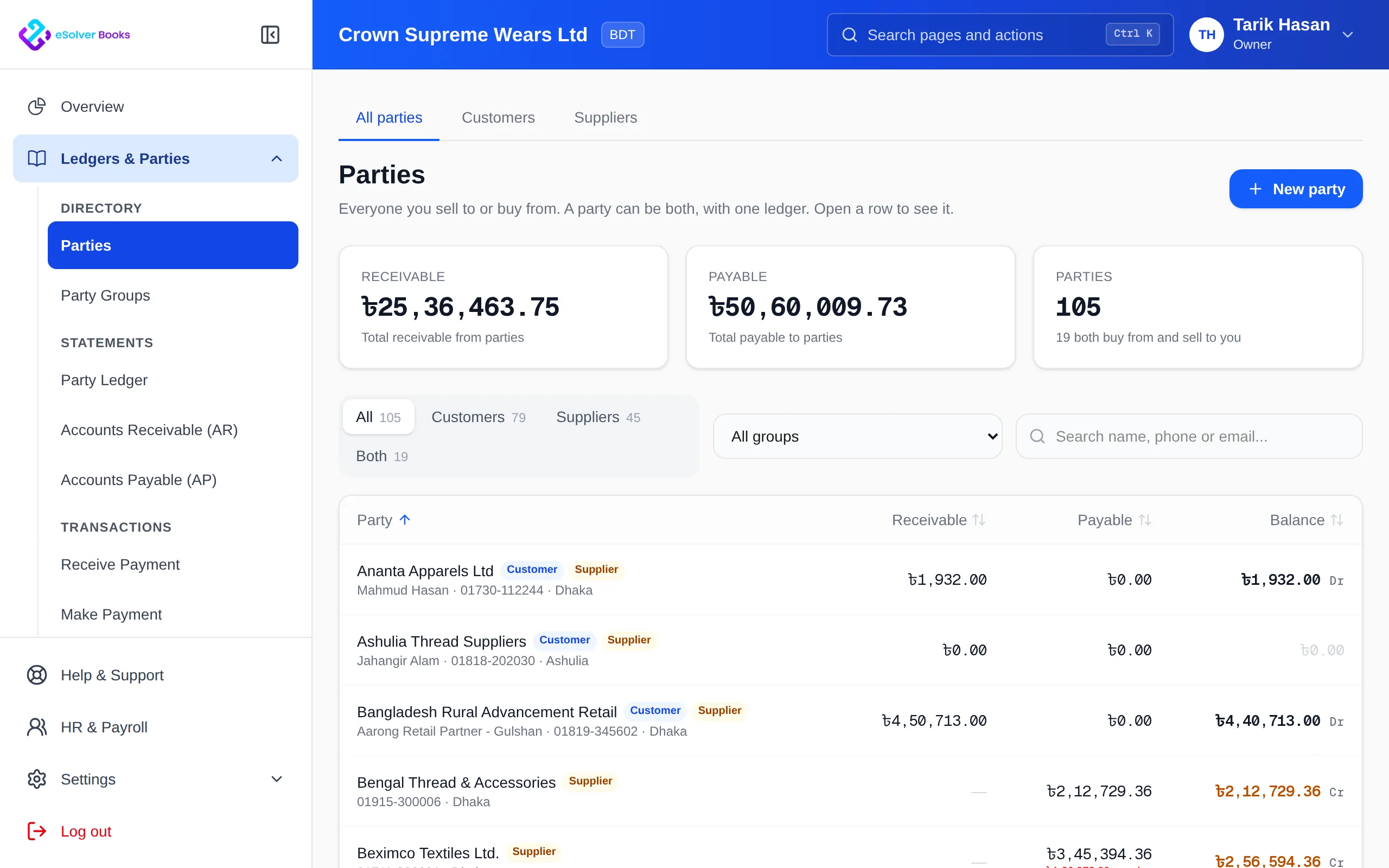
In Bangladesh the same mill, distributor or transporter is often both a customer and a supplier. eSolverBooks keeps every customer and supplier in one Parties directory under Ledgers & Parties. A business that is both is one party with one Dr/Cr ledger, and what they owe you can be set off against what you owe them.
eSolverBooks / Sales / Parties directory
How it works
A practical workflow your team can follow without adding disconnected spreadsheets or repeated data entry.
Create a party with name, mobile, email, address, BIN and TIN, and mark whether you buy from them, sell to them, or both.
Invoices, receipts and sales returns build the customer side; bills, payments and purchase returns build the supplier side, all on one ledger.
The party page shows total receivable, total payable and a single Dr/Cr balance, with the ledger for any period as PDF or Excel.
Set the two sides off instead of paying both ways, and merge any customer and supplier that turn out to be the same business.
What you get
One khatiyan per business, balances you can agree in a single phone call, and no duplicate records splitting the history in two.
Sales and purchases for a party on one running balance: Dr raises what they owe you, Cr what you owe them.
Settle the receivable against the payable up to the smaller of the two. Their oldest invoices and your oldest bills to them are marked paid; no money moves.
Undo a set-off from its row in the ledger. Both halves are reversed together with dated reversing entries and a recorded reason.
Customers and suppliers with the same BIN, mobile number or name are listed as possible duplicates. Merge a pair into one party, or leave it.
Keep several contact persons per party and dated notes, shown on both the sales and the purchase side.
Group parties as wholesaler, retailer or mill. A group's price list and discount apply when you sell to its members.
Feature details
Each part below is a screen or setting your team will use, with what it does and where a plan limit applies.
Everyone in one list.
Filter the directory by role and see receivable and payable totals across all parties.
Turn an existing customer into a supplier, or the other way round, instead of creating a second record.
Find a party the way your team remembers them.
BIN, TIN, VAT status, payment terms, credit limit and supply nature kept on the party.
The khatiyan, done properly.
Choose from and to dates; the ledger opens with the balance brought forward.
Invoices, receipts, credit notes, bills, payments, debit notes and set-offs, each labelled sale or purchase.
Download or print the ledger to agree the balance with the party.
Open any party's ledger directly from Ledgers & Parties without going through the directory.
Fewer payments in both directions.
Record the amount, date and a note such as "agreed with their accounts on the phone".
See every party you both sell to and buy from, with the amount that can be set off.
A wrong set-off is reversed, not deleted, and the reason stays with it.
Agree a supplier's statement with your books (Professional and Enterprise).
One business, one record.
Pairs found by matching BIN, mobile number or name, with the reason shown.
Nothing merges on its own. Merging keeps the customer record and moves the supplier's bills, payments and details onto it.
A group links to a price list; a party's own price list still comes first.
Parties, the party ledger, set-off, merge and party groups are on Starter, Professional and Enterprise.
Questions
A party is anyone you sell to, buy from, or both. Customers and suppliers share one Parties directory under Ledgers & Parties, so a business on both sides has one record and one ledger.
Open a party that has both a receivable and a payable and choose Set off. Enter an amount up to the smaller balance and a date; their oldest invoices and your oldest bills to them are marked paid. No money moves, and it can be reversed later from the ledger.
Yes. Possible duplicates lists customer and supplier pairs with the same BIN, mobile number or name. Merge a pair and the supplier's bills, payments and details move onto the customer record, giving one ledger.
Yes. Choose the period on the Ledger tab and download it as PDF or Excel, or print it.
Keep exploring
Create a clearer workflow and give your team information they can understand and trust.